
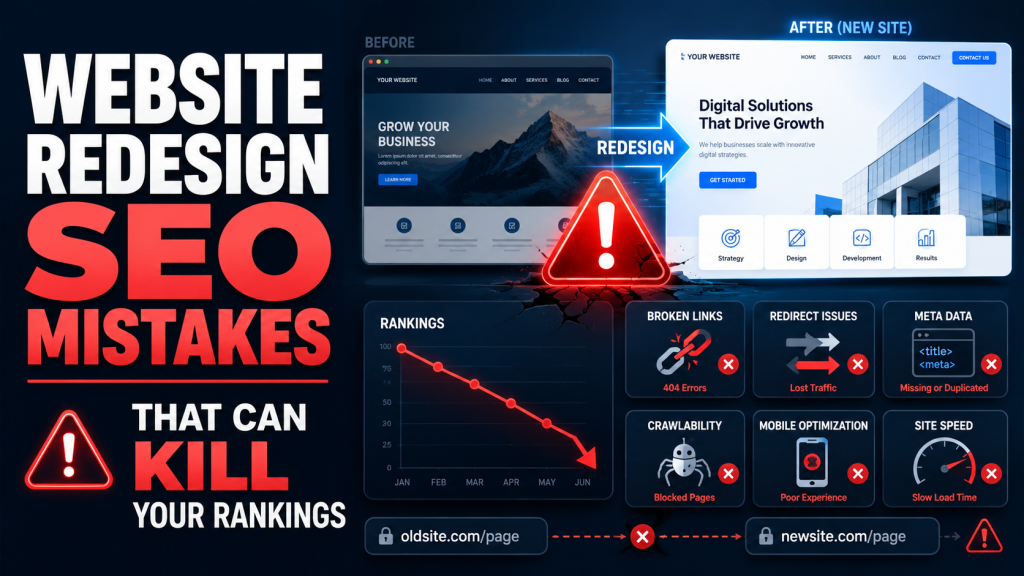
Redesigning a website can improve your brand image, user experience, conversion rate, and overall business credibility. However, a redesign can also create serious SEO problems if it is not planned correctly. Many businesses launch a beautiful new website only to discover that their organic traffic has dropped, rankings have disappeared, and important pages are no longer visible on Google.
These problems usually happen because of common website redesign SEO mistakes. During a redesign, teams often focus on visuals, layout, branding, and functionality. SEO is sometimes treated as an afterthought. Unfortunately, Google does not care how modern your new website looks if it cannot crawl, index, and understand your pages properly.
A website redesign changes more than design. It can affect URLs, page structure, internal links, metadata, content, site speed, mobile usability, schema markup, and crawl paths. If these elements are not protected, your website can lose years of SEO progress within days of launch.
This guide explains the most common redesign SEO issues and provides a practical SEO migration checklist to help protect your rankings during a website relaunch.
Why Website Redesigns Affect SEO
A website redesign affects SEO because search engines rely on technical signals to understand your website. Google crawls your pages, follows links, reads content, evaluates metadata, checks performance, and stores indexed URLs in its search database. When a redesign changes these signals too suddenly or incorrectly, rankings can be disrupted.
One of the biggest risks is URL change. If your old URLs are ranking on Google and receiving backlinks, they have accumulated SEO value over time. When those URLs are removed or changed without proper redirects, Google may treat the new pages as completely different pages. As a result, rankings can drop because the original authority is not passed correctly.
Indexing is another major factor. If pages are accidentally blocked by robots.txt, marked with noindex tags, removed from the sitemap, or hidden behind JavaScript problems, Google may not index them properly. Even strong content can lose visibility if search engines cannot access it.
Metadata also plays an important role. Page titles, meta descriptions, headings, canonical tags, alt text, and structured data help search engines understand page relevance. During redesigns, this information is often overwritten, duplicated, shortened, or removed. These changes can weaken keyword targeting and reduce click-through rates from search results.
Crawlability is equally important. Google discovers content by following links across your website. If internal links break, navigation changes drastically, or important pages become buried too deep, search engines may crawl your website less efficiently. This can affect both rankings and index coverage.
A redesign can be positive for SEO when handled correctly. Better site architecture, faster loading speed, improved mobile design, clearer content, and stronger internal linking can improve rankings over time. However, without a structured website relaunch SEO process, the redesign can damage performance instead of improving it.
Most Common SEO Mistakes During Website Redesigns
Many ranking losses after a redesign are preventable. The issue is rarely the redesign itself. The real problem is launching without technical SEO planning. Below are the most common website redesign SEO mistakes businesses make.
Changing URLs Without Redirects
Changing URLs without proper redirects is one of the most damaging redesign SEO issues. URLs are not just addresses. They are SEO assets. If a page has ranked for months or years, earned backlinks, and received organic traffic, that URL has value.
When a URL changes, the old version must point to the new version using a 301 redirect. A 301 redirect tells search engines that the page has moved permanently. It also helps transfer ranking signals from the old URL to the new one.
For example, if your old service page was:
/digital-marketing-services/
and the new URL becomes:
/services/digital-marketing/
the old URL should redirect directly to the new matching page.
A common mistake is redirecting all old pages to the homepage. This creates a poor user experience and weakens relevance. Google expects old pages to redirect to the most relevant new pages. If a page about SEO services redirects to the homepage instead of the new SEO services page, the ranking value may not transfer properly.
Another mistake is using temporary 302 redirects instead of permanent 301 redirects. While 302 redirects have their place, website migrations usually require 301 redirects for permanent URL changes.
Before launching a redesigned website, every important old URL should be mapped to its new destination. This includes service pages, product pages, blog posts, landing pages, category pages, and any URLs with backlinks or organic traffic.
Removing Indexed Content
Another common mistake is deleting or reducing content that already ranks. During a redesign, businesses often want cleaner pages with less text. Designers may remove sections, shorten copy, hide FAQs, or replace keyword-rich content with visual elements.
This can hurt SEO because Google ranks pages based on relevance, depth, and usefulness. If a page previously ranked because it contained detailed information, removing that information can reduce its ability to rank.
For example, a service page may have ranked because it explained benefits, pricing factors, process, FAQs, industries served, and location relevance. If the redesigned version only includes a short paragraph and a contact button, Google may no longer see it as a strong result.
This does not mean every old sentence must stay. A redesign is a good opportunity to improve content. However, content decisions should be based on SEO performance data. Pages with traffic, backlinks, impressions, and keyword rankings should be reviewed carefully before content is removed.
Content should be improved, reorganized, and refreshed rather than deleted without analysis. Important headings, keyword themes, internal links, FAQs, and conversion-focused sections should be preserved where possible.
If content must be removed, check whether it has search value first. Use Google Search Console, analytics data, backlink reports, and keyword rankings to determine whether the content supports organic performance.
Broken Internal Links
Internal links help users and search engines move through your website. They connect related pages, distribute authority, and help Google understand which pages are important. During a redesign, internal links often break because URLs change, pages are deleted, or navigation structures are rebuilt.
Broken internal links create several problems. Users land on 404 pages, search engines waste crawl budget, and important pages may lose internal authority. If a page was previously linked from multiple areas of the site but is no longer linked after launch, it may become harder for Google to discover and evaluate.
Navigation changes can also cause SEO problems. For example, if your main services were previously linked from the header menu but are now hidden behind buttons, tabs, or scripts, crawlability may suffer. Important pages should be accessible through clear HTML links.
Blog posts can also lose value after a redesign if internal links are not updated. Older articles may still point to outdated URLs, deleted resources, or old category structures. These links should be audited and corrected before launch.
A strong internal linking strategy should be part of every website relaunch SEO plan. Key commercial pages should receive links from the homepage, navigation, relevant blog posts, footer sections, and related service pages. This helps both users and search engines understand your site hierarchy.
Ignoring Mobile Optimization
Mobile optimization is no longer optional. Most users browse websites from mobile devices, and Google evaluates websites with mobile-first indexing. This means Google primarily uses the mobile version of your content for indexing and ranking.
A redesign may look excellent on desktop but fail on mobile. Common mobile issues include oversized images, hard-to-read text, buttons that are too close together, hidden content, slow loading elements, broken menus, and layout shifts.
If important content is visible on desktop but missing or collapsed incorrectly on mobile, Google may not evaluate the page as expected. Mobile users may also leave quickly if the experience is frustrating, which can indirectly affect performance through poor engagement and lower conversions.
Mobile SEO is not only about responsive design. It also includes speed, usability, accessibility, content consistency, navigation, and technical rendering. Every page template should be tested on multiple screen sizes before launch.
Service pages, product pages, forms, checkout pages, booking pages, and contact sections deserve special attention. These are often the pages that generate leads and revenue. If they are difficult to use on mobile, the redesign may reduce conversions even if rankings remain stable.
Slow Website Speed After Redesign
A redesign often adds new images, animations, sliders, scripts, tracking tools, fonts, videos, and visual effects. These elements may look impressive, but they can slow down the website if not optimized.
Website speed matters because users expect fast pages. Slow websites create poor user experiences and can reduce conversions. Page experience signals, including Core Web Vitals, can also influence SEO performance, especially in competitive search results.
Common speed problems after a redesign include uncompressed images, too many JavaScript files, render-blocking resources, heavy page builders, unused CSS, poor hosting, and lack of caching. Large background videos and autoplay elements can also increase load time.
Speed should be tested before launch, not after traffic drops. Developers should optimize image formats, compress assets, reduce unnecessary scripts, use lazy loading, enable caching, and test Core Web Vitals.
The goal is not only to create an attractive website. The goal is to create a fast, stable, mobile-friendly website that search engines and users can access easily.
SEO Website Migration Checklist
A successful redesign requires a structured SEO process before, during, and after launch. Use this SEO migration checklist to reduce risk and protect your rankings.
1. Benchmark Current SEO Performance
Before making changes, document your current SEO performance. This gives you a baseline for comparison after launch.
Record your top organic landing pages, keyword rankings, traffic levels, conversions, indexed pages, backlinks, crawl errors, and Core Web Vitals. Use Google Analytics, Google Search Console, rank tracking tools, and SEO crawling software.
Pay special attention to pages that generate leads, sales, or high-value traffic. These pages should be protected throughout the redesign.
2. Crawl the Existing Website
Run a full crawl of your current website before redesign work begins. Export all existing URLs, title tags, meta descriptions, headings, canonical tags, status codes, internal links, image alt text, and structured data.
This crawl acts as your SEO backup. It helps you identify what exists now and what must be preserved or improved during the redesign.
Without a pre-launch crawl, it becomes much harder to diagnose what changed after launch.
3. Create a URL Redirect Map
If URLs are changing, create a detailed redirect map. Every old URL should be matched to the most relevant new URL.
Avoid redirect chains, redirect loops, and homepage-only redirects. Each old URL should redirect directly to the final destination with a 301 status code.
Include all important pages, blog posts, product URLs, category pages, landing pages, and URLs with backlinks. Test redirects before launch to ensure they work correctly.
4. Preserve High-Performing Content
Review your top-performing pages before rewriting or removing content. Identify which sections contribute to rankings and user engagement.
Preserve important keyword themes, headings, FAQs, internal links, and helpful explanations. Improve weak content, but avoid deleting valuable content without a clear SEO reason.
If pages are being consolidated, make sure the new page includes the strongest and most relevant information from the old pages.
5. Review Metadata and Headings
Page titles, meta descriptions, H1 tags, H2 tags, and canonical tags should be reviewed before launch. Do not allow the redesign process to replace optimized metadata with generic text.
Each important page should have a unique title tag, compelling meta description, clear H1, logical heading structure, and correct canonical tag.
Metadata should support both rankings and click-through rates. It should describe the page accurately while including relevant keywords naturally.
6. Protect Internal Linking
Update internal links so they point to the correct new URLs. Do not rely only on redirects for internal navigation. Links should point directly to live destination pages.
Review header navigation, footer links, sidebar links, blog links, related content sections, buttons, breadcrumbs, and XML sitemap links.
Important pages should not become orphan pages. Every key page should be reachable through internal links.
7. Check Robots.txt and Noindex Tags
One of the most dangerous website relaunch SEO mistakes is accidentally blocking the new website from search engines. This often happens when staging settings are moved to the live site.
Before launch, check robots.txt, meta robots tags, X-Robots-Tag headers, and CMS visibility settings. Make sure important pages are indexable and crawlable.
After launch, confirm that Google can access the site using Google Search Console.
8. Update XML Sitemaps
Your XML sitemap should include only clean, indexable, canonical URLs. Remove old URLs, redirected URLs, duplicate URLs, and noindex pages.
Submit the updated sitemap in Google Search Console after launch. This helps Google discover the new structure faster.
However, a sitemap does not replace internal linking. Your website should still have a clear crawl path through navigation and contextual links.
9. Test Mobile Usability
Test the redesigned website on mobile devices before launch. Check page layouts, menus, forms, buttons, images, popups, and checkout or lead generation paths.
Make sure content is consistent between desktop and mobile. Important SEO content should not disappear on mobile.
Mobile usability testing should include both technical checks and real user experience review.
10. Improve Website Speed
Run speed tests before and after launch. Review Core Web Vitals, image sizes, JavaScript load, CSS files, caching, server response time, and third-party scripts.
Compress images, use modern formats, reduce unnecessary plugins, limit heavy animations, and optimize code.
A fast website improves user experience and supports stronger SEO performance.
11. Validate Structured Data
If your old website used schema markup, make sure it is transferred correctly. This may include LocalBusiness schema, Organization schema, FAQ schema, Product schema, Review schema, Breadcrumb schema, or Article schema.
Structured data helps search engines understand your content and may support rich results in search. Test schema before launch to avoid errors.
12. Monitor After Launch
SEO work does not end when the redesigned website goes live. The first few weeks after launch are critical.
Monitor Google Search Console for indexing issues, crawl errors, sitemap problems, ranking changes, and coverage warnings. Check analytics for traffic drops, conversion changes, and unusual behavior.
Run a post-launch crawl to identify broken links, missing metadata, redirect problems, duplicate content, and indexability issues.
If rankings fluctuate slightly, that can be normal. However, major drops should be investigated immediately.
Conclusion
A website redesign can strengthen your online presence, improve user experience, and increase conversions. However, it can also damage your organic visibility if SEO is ignored. The most common website redesign SEO mistakes include changing URLs without redirects, removing indexed content, breaking internal links, ignoring mobile optimization, and launching a slower website.
The good news is that these problems are preventable. With a clear SEO migration checklist, proper planning, and technical oversight, your business can relaunch with confidence. A successful redesign should protect existing rankings while creating a stronger foundation for future SEO growth.
SEO should be part of the redesign process from the beginning, not added after launch. Designers, developers, content writers, and SEO specialists should work together to ensure that the new website is both visually strong and search engine friendly.
Planning a redesign? Let DGTECH protect your rankings during migration. Our team can manage the technical SEO process, identify redesign SEO issues before they cause damage, and help your website relaunch SEO strategy succeed without sacrificing your Google visibility.